
Guidelines
- Run the real code and the real services. Seed them with data instead of mocking them. If something can’t run in a container, such as a third-party SaaS, mock it at the network edge through the app’s existing base-URL setting, and keep a list of what you mocked, because each mock is something the eval doesn’t measure.
- Drive an entry point the app already has: a route, a CLI command, a queue consumer, or a function. If you add a code path just for evals, you end up testing that path. When nothing existing reaches the behavior you want, adding an entry point is fine, but make it a deliberate choice, for example an internal endpoint that is off unless a config flag is set.
- Give every case its own environment. Each trial boots its own services with its own data, so try to avoid sharing a database between cases.
- Use the real model. A canned or recorded response only tests the harness. Point the app at the model through its normal configuration and pass the API key through the agent’s env.
Run the services in the container
Everything the entry point touches runs inside the one container, with no docker-in-docker. Install the same database versions as production, start them as background processes, and create the schema the way the app does at startup. Run the app as its production artifact. A compiled binary should be built in a builder stage of the same Dockerfile, because one built on your Mac is the wrong format. Harbor starts the container with its own keep-alive command, so the image’sCMD and entrypoint never run. Put the startup in a script that your agent calls, which launches each service in the background, sends its output to /logs/agent/, and waits until the app is ready:
evals/image/shared/start_stack.sh
Seed the data
Some data is the same for every case, such as reference tables, a default organization and user, and config rows. Seed that in the image build or at startup. Data that reproduces one scenario, such as the conversation or the account state, goes in the task’senvironment/ folder and is loaded by one shared seed script, so adding a case means copying a directory and never changing the harness.
When creating a record involves encryption or validation, seed it through the app’s own API and let the server do the work. For bulk fixtures, insert into the database directly.
Drive the entry point
The Harbor agent is a smallBaseInstalledAgent subclass that runs commands inside the container, next to your app. The example’s agent.py is a complete one, and Harbor’s custom agents guide documents the full interface (lmnr-cli pins Harbor 0.25.0). Keep its run() thin: start the stack, seed the case, and call the driver. A few things to know:
- Leave
install()empty and put dependencies in the image.install()runs in every trial. - Read the model from
self.model_name, so--modelworks. - Only import
harbor, the standard library, and modules in the suite directory. The class itself runs in the Harbor process, on your machine or in Tracevell’s orchestrator, and not inside the container.
run_case.py. It triggers your entry point and waits for the result. For a synchronous entry point, such as an HTTP call or a function that returns, call it with a timeout and record the response. For an asynchronous one, such as a job on a queue, poll the status the app writes until it reaches a final state, up to a hard timeout.
Turn the result into an outcome the verifier can grade, and write the details to /logs/agent/result.json. Use failed and timeout as their own outcomes, so a crash is never mistaken for a wrong answer from the model:
0 whenever it produced an outcome, including failed and timeout. A non-zero exit marks the trial as an error, which should mean the harness itself broke. Keep the driver’s timeout shorter than the exec timeout_sec, and both shorter than the task’s [agent] timeout_sec.
Grade the result
tests/test.sh is the verifier’s entry point, and it can call anything: a Python script that compares against expected.json, a rubric, or an LLM judge with its key in [verifier.env]. It writes the reward to /logs/verifier/reward.txt, or to /logs/verifier/reward.json to report several named rewards, which become separate scores in Tracevell. A pass or fail check is the easiest place to start, and an LLM judge works well for things like the tone or completeness of a reply. Where possible, pair the judge with a hard check on the state the agent changed, as the example’s verify.py does.
Where the verifier runs is set by environment_mode under [verifier] in task.toml:
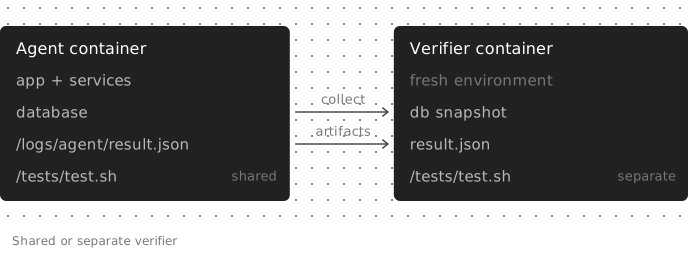
A shared verifier runs in the agent's container and sees everything. A separate verifier gets a fresh container with only the files the task hands over.
"shared"(the default) runs in the agent’s container after the agent finishes, and can read anything the run left behind, such as/logs/agent/result.jsonor the database."separate"runs in a fresh container that only sees what the task declares: files listed in the top-levelartifacts = [...], plus snapshots taken by[[verifier.collect]]commands before the environment is torn down. Use it when the verifier needs its own dependencies, or when it shouldn’t be able to see the app’s internals.
Next steps
Capture the trajectory
Get the app’s LLM and tool calls into every trial’s trace.
Track failures with Signals
Find production traces worth turning into cases.
The evals folder
Reference for
lmnr.yaml, harbor.yaml, task.toml, and secrets.Troubleshooting
Fixes for stale images, missing env vars, and empty traces.